
linux网络流量实时监控工具之nload | wdlinux致力于Linux服务器架构,性能优化.免费CDN加速系统,免费智能DNS解析,负载均衡,集群分流
linux网络流量实时监控工具之nload
[我的Linux,让Linux更易用]个人觉得nload是个很好用的一个工具,功能也很强.只是相对单一,只能查看总的流量,不能像iptraf那样,可针对IP,协议等
可以实时地监控网卡的流量,分Incoming,Outgoing两部分,也就是流入与流出的流量同时统计当前,平均,最小,最大,总流量的值,使人看了一目了然,如下图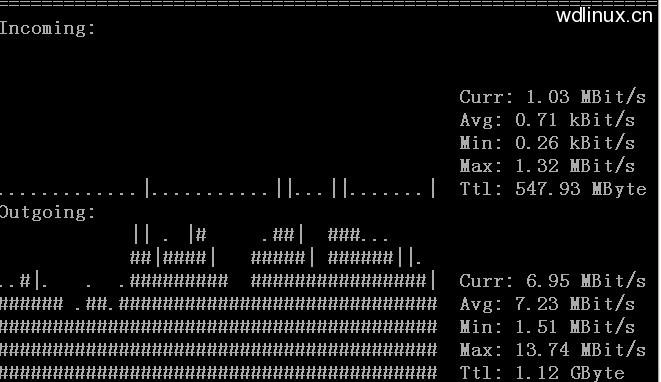
FAQ
如安装时提示下面的问题configure: error: ncurses library or development files not found. ncurses is required for nload.make: *** No targets specified and no makefile found. Stop.make: *** No rule to make target `install'. Stop.
用 yum install -y ncurses-devel 即可解决
Debian: apt-get install -y libncurses5-dev
安装
tar zxvf nload-0.7.4.tar.gz
cd nload-0.7.4
./configure;make;make install
使用
直接用nload回车即可,也可以指定网卡,如nload eth1还可以指定是以K或M来显示流量,如nload -u M显示的流量是以MB为单位的看看还有哪些参数或选项
[root@wdlinux ~]# nload -hnload version 0.7.4
Copyright (C) 2001 - 2008 by Roland Riegelnload comes with ABSOLUTELY NO WARRANTY. This is free software, and you arewelcome to redistribute it under certain conditions. For more details see theGNU General Public License Version 2 (http://www.gnu.org/copyleft/gpl.html).Command line syntax:
nload [options] [devices]nload --help|-h
Options:
-a period Sets the length in seconds of the time window for averagecalculation.Default is 300.-i max_scaling Specifies the 100% mark in kBit/s of the graph indicating theincoming bandwidth usage. Ignored if max_scaling is 0 or theswitch -m is given.Default is 10240.-m Show multiple devices at a time; no traffic graphs.-o max_scaling Same as -i but for the graph indicating the outgoing bandwidthusage.Default is 10240.-t interval Determines the refresh interval of the display in milliseconds.Default is 500.-u h|b|k|m|g Sets the type of unit used for the display of traffic numbers.H|B|K|M|G h: auto, b: Bit/s, k: kBit/s, m: MBit/s etc.H: auto, B: Byte/s, K: kByte/s, M: MByte/s etc.Default is h.-U h|b|k|m|g Same as -u, but for a total amount of data (without "/s").H|B|K|M|G Default is H.devices Network devices to use.Default is to use all auto-detected devices.--help-h Print this help.example: nload -t 200 -i 1024 -o 128 -U M