
设置好SSH登录
1、在Linux远程服务器生成密钥:
登录远程Linux VPS/服务器,执行:
root@vpser:~# ssh-keygen -t rsa //先运行这个命令
Generating public/private rsa key pair.
ot/.ssh/id_rsa): //直接回车 Created directory '/root/.ssh'. Enter p
Enter file in which to save the key (/r
oassphrase (empty for no passphrase):                                    //输入密钥密码
//重复密钥密码 Your identification has been saved in /root/.ssh/id_rsa. //提示公钥和私钥已经存放在/r
Enter same passphrase again:
 oot/.ssh/目录下
Your public key has been saved in /root/.ssh/id_rsa.pub.
The key fingerprint is:
15:23:a1:41:90:10:05:29:4c:d6:c0:11:61:13:23:dd root@vpser.net
| |
The key's randomart image is:
+--[ RSA 2048]----+
|=&@Bo+o o.o      |
|=o=.E  o . o     |
| .    .   .      |
|         .       |
|        S        |
|
  |
|                 |
|                 |
+-----------------+
root@vpser:~#
2、把id_rsa.pub改名并修改权限。
mv /root/.ssh/id_rsa.pub /root/.ssh/authorized_keys
chmod 600 /root/.ssh/authorized_keys
3、使用winscp以root帐号密码的方式登录vps
把/root/.ssh/id_rsa文件下载到本地并删除服务器上的id_rsa文件,
修改/etc/ssh/sshd_config 文件,将RSAAuthentication 和 PubkeyAuthentication 后面的值都改成yes ,
将PasswordAuthentication yes 修改成 PasswordAuthentication no,并把PasswordAuthentication no前面的注释符#去掉,保存。
4、重启sshd服务
Debian/Ubuntu执行/etc/init.d/ssh restart ;CentOS执行:/etc/init.d/sshd restart。
5、搬瓦工的root密码太简单了,我现在修改root密码
passwd root
输入两遍密码,然后提示密码修改成功。
6、使用putty登录
putty使用的私钥文件和Linux服务器或XShell的私钥格式不同,如果使用putty的话,需要将Linux主机上生成的id_rsa文件下载 的本地。运行putty压缩包里面的puttygen.exe,选择Conversions->Import key选择私钥文件id_rsa,输入密钥文件的密码,会出现如下界面:
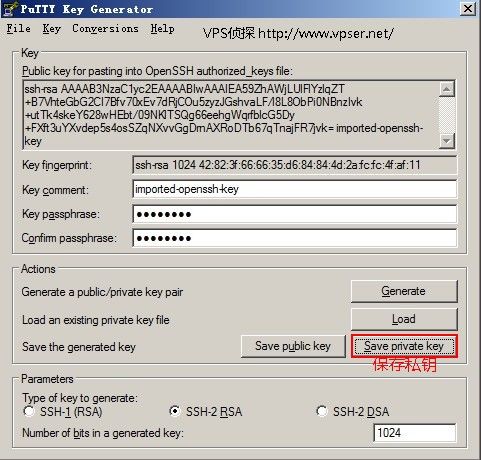
点击“Save Private Key",将私钥保存为id_rsa.ppk
运行putty,在Host Name填写:root@主机名或ip
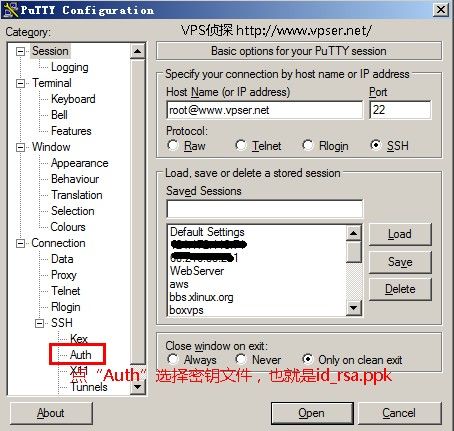
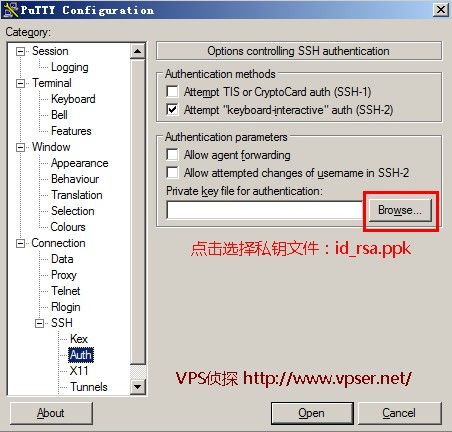
如果设置了密钥密码,出现:Passphrase for key “imported-openssh-key"时输入密钥密码。
如果设置没问题就会登录成功,出现用户提示符。
再提醒一下一定要保存好Putty私钥文件id_rsa.ppk或Linux服务器下载下来的id_rsa私钥文件